
From Sales Tool to Business Platform
Evolving a vertical SaaS product to serve the full customer lifecycle, with 50% beta adoption of new features
As Lead Designer, I shaped ResponsiBid's expansion from a focused quoting tool into an end-to-end platform covering everything from first contact to final payment.
Role
Lead UX Designer
Team
Duration
Jul 2024 - Present
Limited Market Reach
I joined ResponsiBid during a time of architectural shift and growth. While I was also focused on improving the usability of our recently launched new interface (Check out more on this here), the company had a larger strategic challenge: Churn had doubled year-over-year, and 25% of it traced directly to the product's lack of operational functionality. Our market reach was limited. There were ambitions to expand into operational tools to cater to the full customer lifecycle, but what this expansion would look like was largely undefined.
ResponsiBid was traditionally a sales tool with quoting, lead nurturing, automated bidding, follow-up, and scheduling. But the product was viewed as a "luxury" supplemental tool by many potential customers. Businesses earlier in their growth couldn't justify the cost because they needed something more fundamental: a way to schedule jobs and collect payment.
Expanding the Value Proposition
Mapping the opportunity
I used a thorough prompt to initiate a deep research dig to understand how competitors covered the operational stages and what patterns prevailed currently in the home services industry. ResponsiBid had strong coverage in the early stages: Automated quoting, lead nurturing, follow-up sequences, and scheduling intelligence were well-built and differentiated. But after a job was scheduled, the product essentially ended. There was no way to manage work orders, generate invoices, or collect payment: the real operational backbone of home services businesses.

Opening the door with a free tier
Traditionally a specialized tool, ResponsiBid is considered expensive by some, increasing friction at the barrier to entry. My product manager researched the benefits of implementing a free version extensively, through discussions with business partners and market analysis. My role was to design a free experience that would serve as an organic lead magnet, showing the benefits of premium features within a meaningful context. The goal was to make the free version useful in its own right, but perhaps more importantly, showcase the value of upgrading to free users. Marketing is targeting advertising to the right audience, and sales have converted several free accounts. The free version became our best-performing organic lead magnet, with a 24.1% conversion rate among activated users.
Conversion touch points were offered to users in meaningful context to show the value of premium features when it mattered right in their workflow. A "premium" icon was applied consistently across upgrade opportunities.
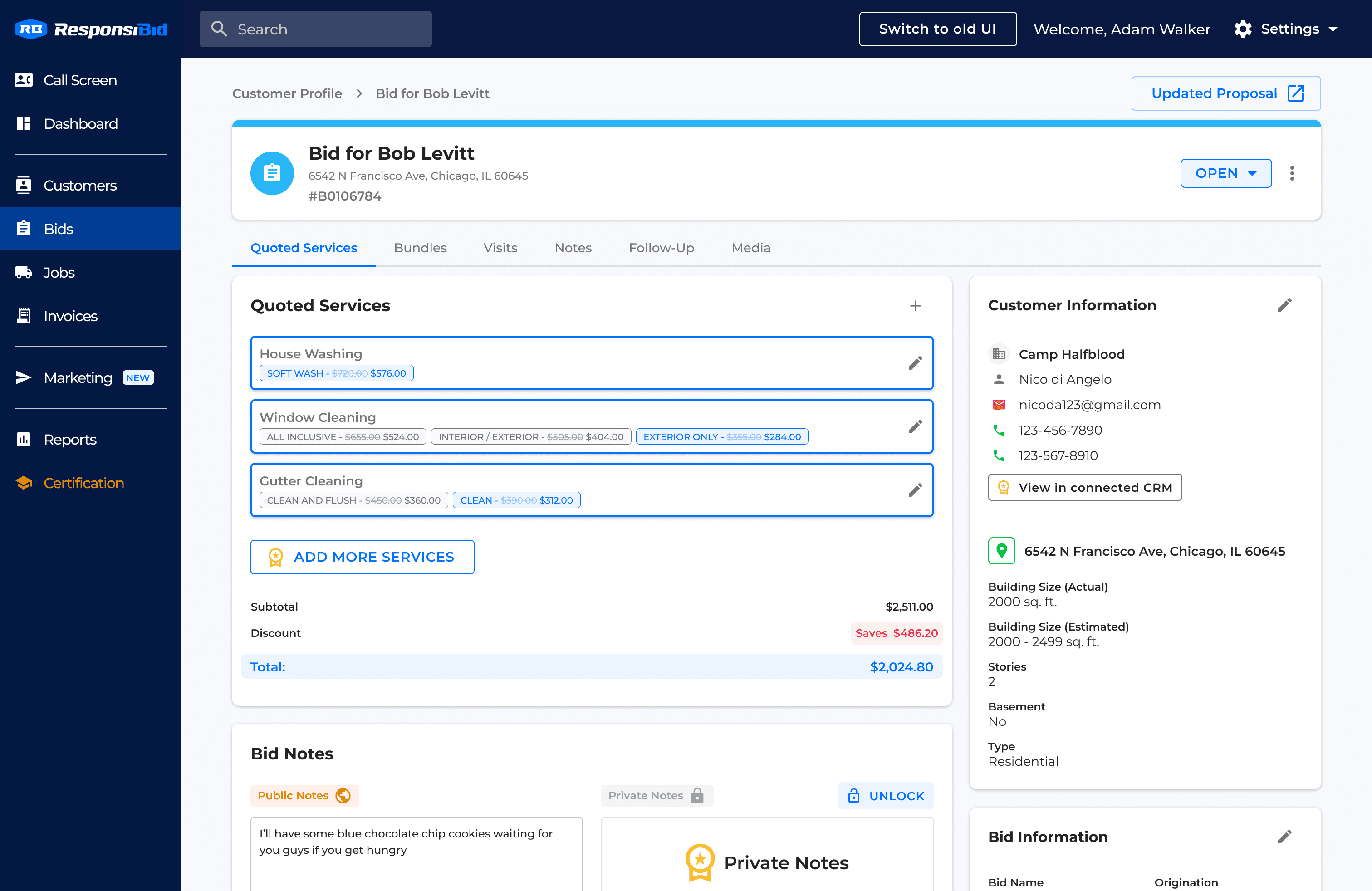
As the platform's operational capabilities grow to serve the full customer lifecycle, I've been analyzing how competitors have offered limited access to work orders and invoicing so that free users can experience more of the lifecycle before committing to a paid account. Free accounts consist of growing small businesses at the perfect stage to convert to these features, and with payment processing being a core necessity for business operations, the potential is exciting. The integration of these features into the free tier is ongoing, but the business case is strong and our early conversion numbers validate the approach.
What users actually needed
The research was clear: users needed to manage work after the sale. Once a bid was accepted, ResponsiBid had nothing to offer. Users were jumping to spreadsheets, paper invoices, or other tools to schedule jobs, track work, and collect payment. The most-requested capabilities were consistent: a way to turn a won bid into a scheduled job, a way to invoice customers and collect payment, and visibility into what work was pending, completed, or unpaid. These weren't "nice to have" features. They were the reason 25% of churn was happening. Users who outgrew the quoting workflow had no reason to stay.
The Decisions that Shaped Everythiing
Restructuring the architecture
ResponsiBid needed to evolve structurally. Bids had been carrying heavy weight, acting as both a proposal and the scheduled work at once, but without the ability to support multiple visits or scheduled history, they were limited and unreliable for business analysis.
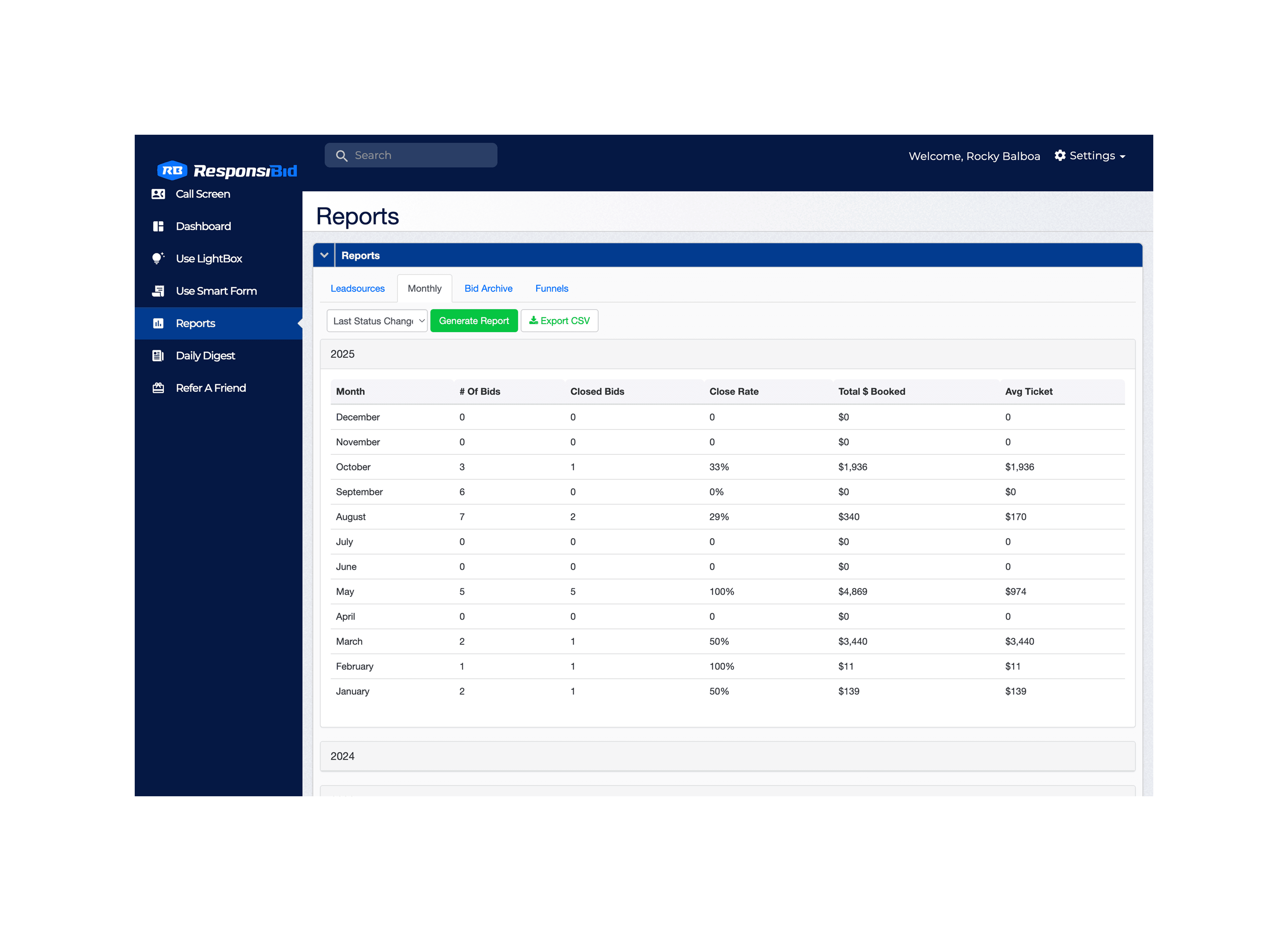
The existing navigation was also bloated and confusing. User testing revealed that many features in the sidebar went untouched:
"Does anyone use the lightbox or smart form? I've not clicked either of those things since I've had ResponsiBid. Maybe just get rid of it. It seems like everything below the dashboard and call screen... do people actually click on those?” — Nicholas F., during a user test
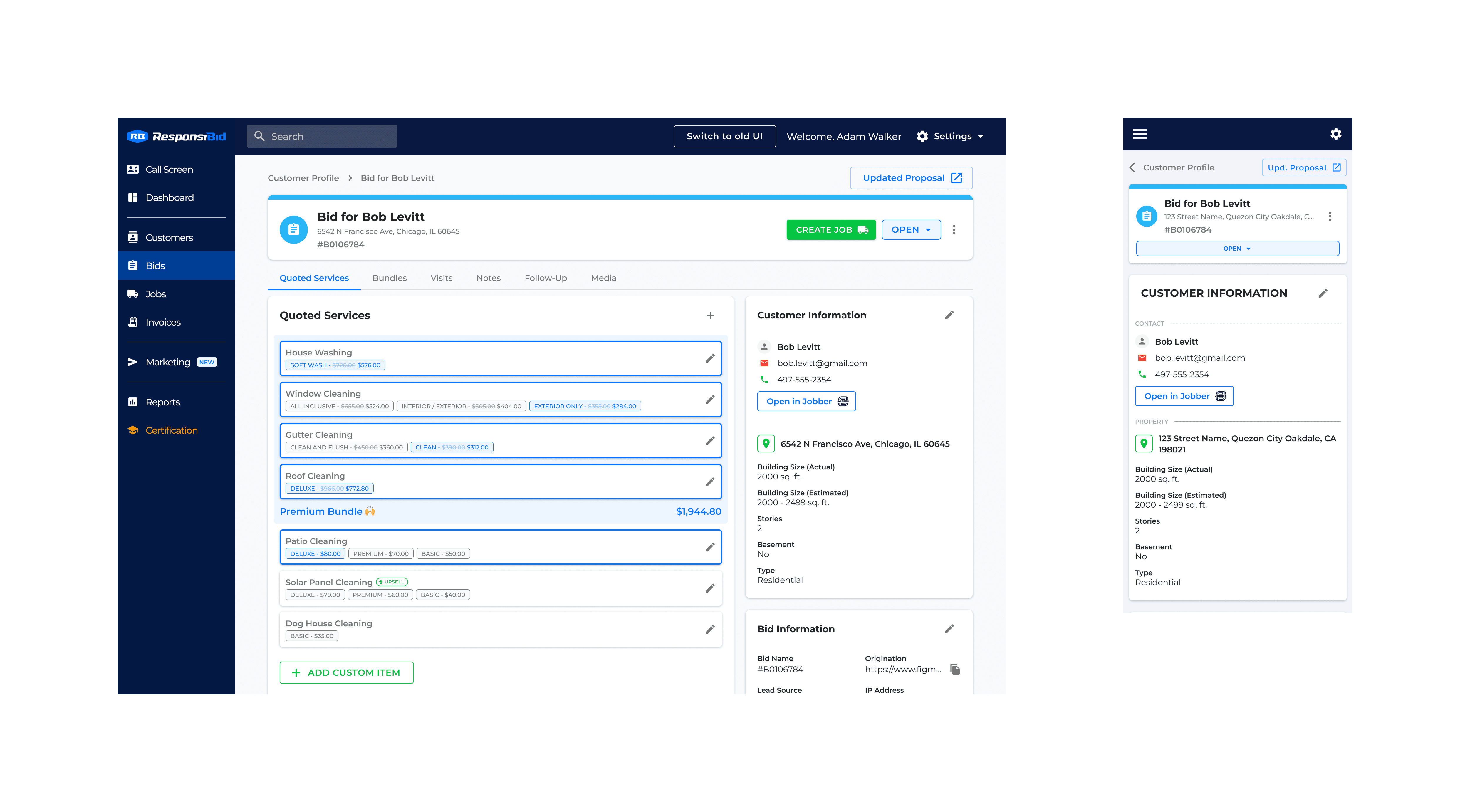
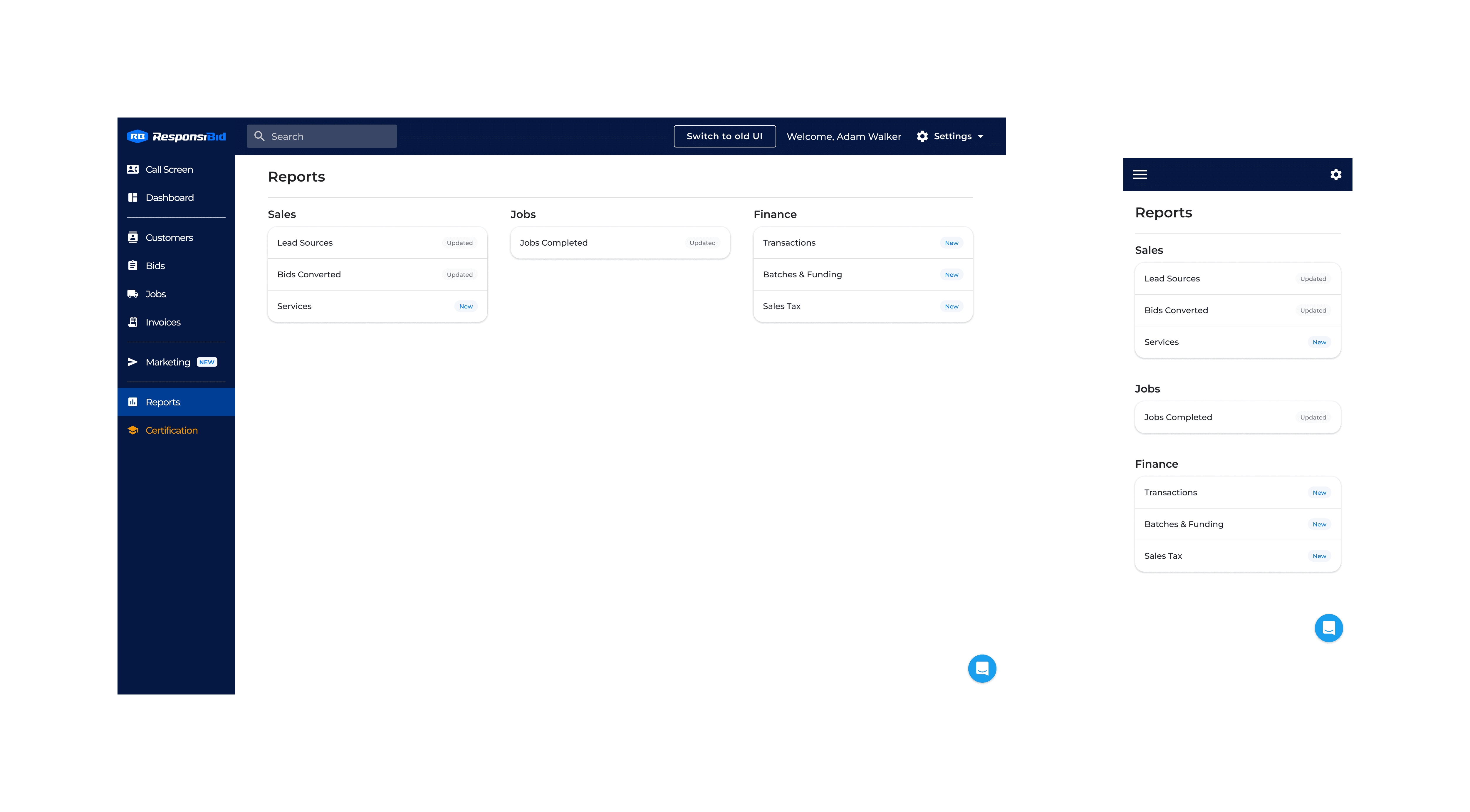
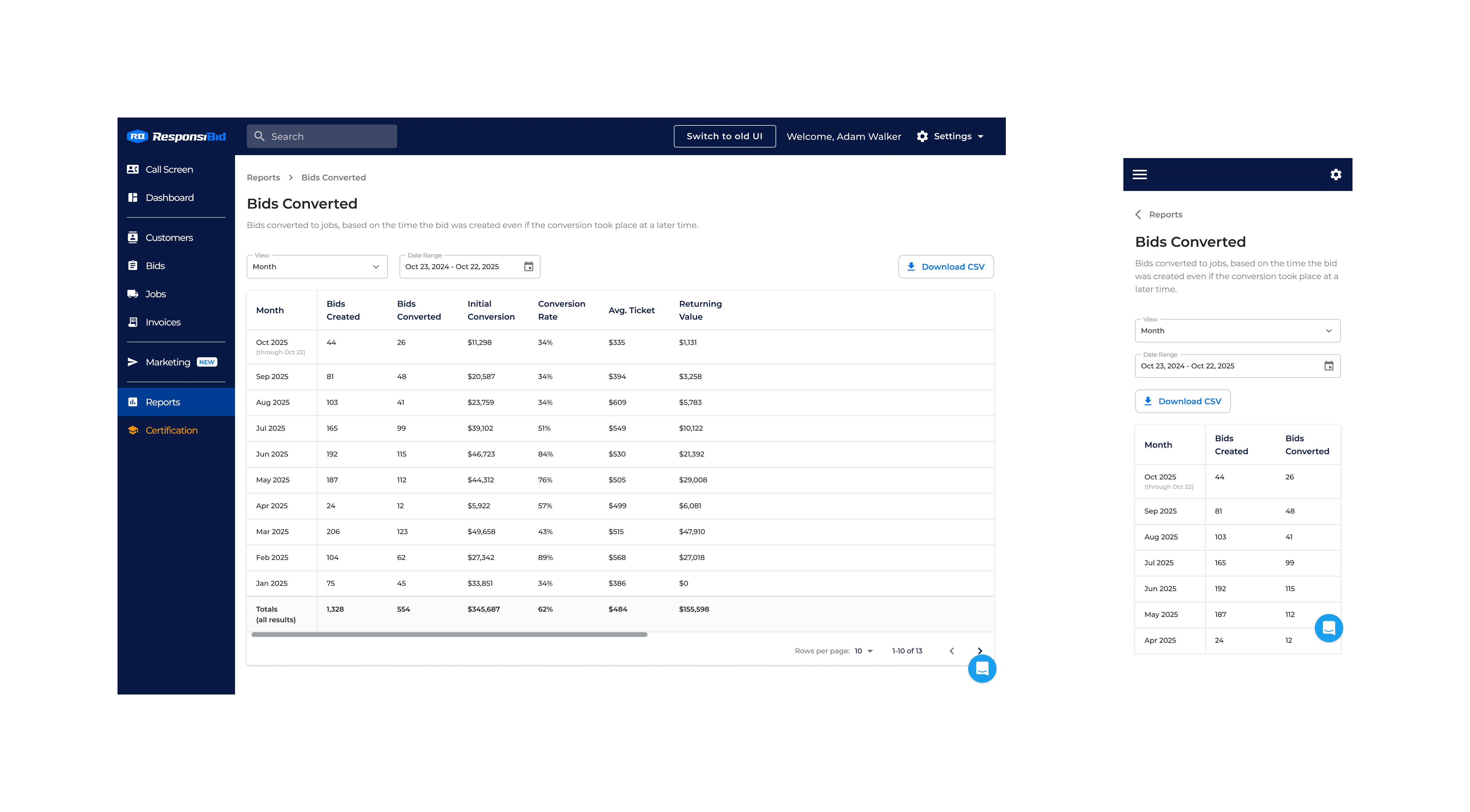
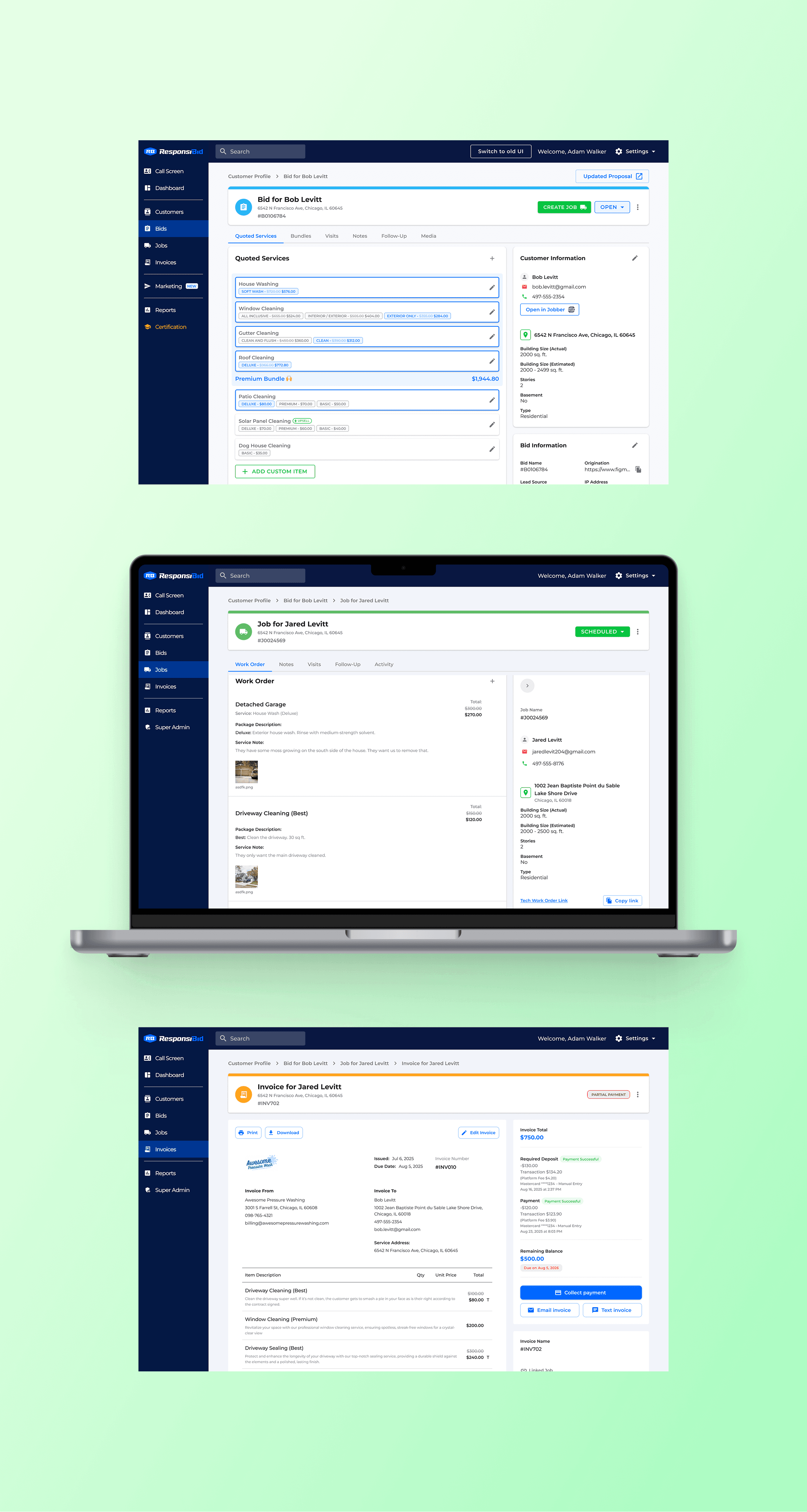
I redesigned the information architecture to introduce Jobs and Invoices as first-class entities in the navigation, replacing underused features and creating a clear hierarchy. The sidebar was restructured so that every item earned its place through actual usage data and user feedback. I introduced consistent page header styling throughout the app to visually ground the user within the architecture.
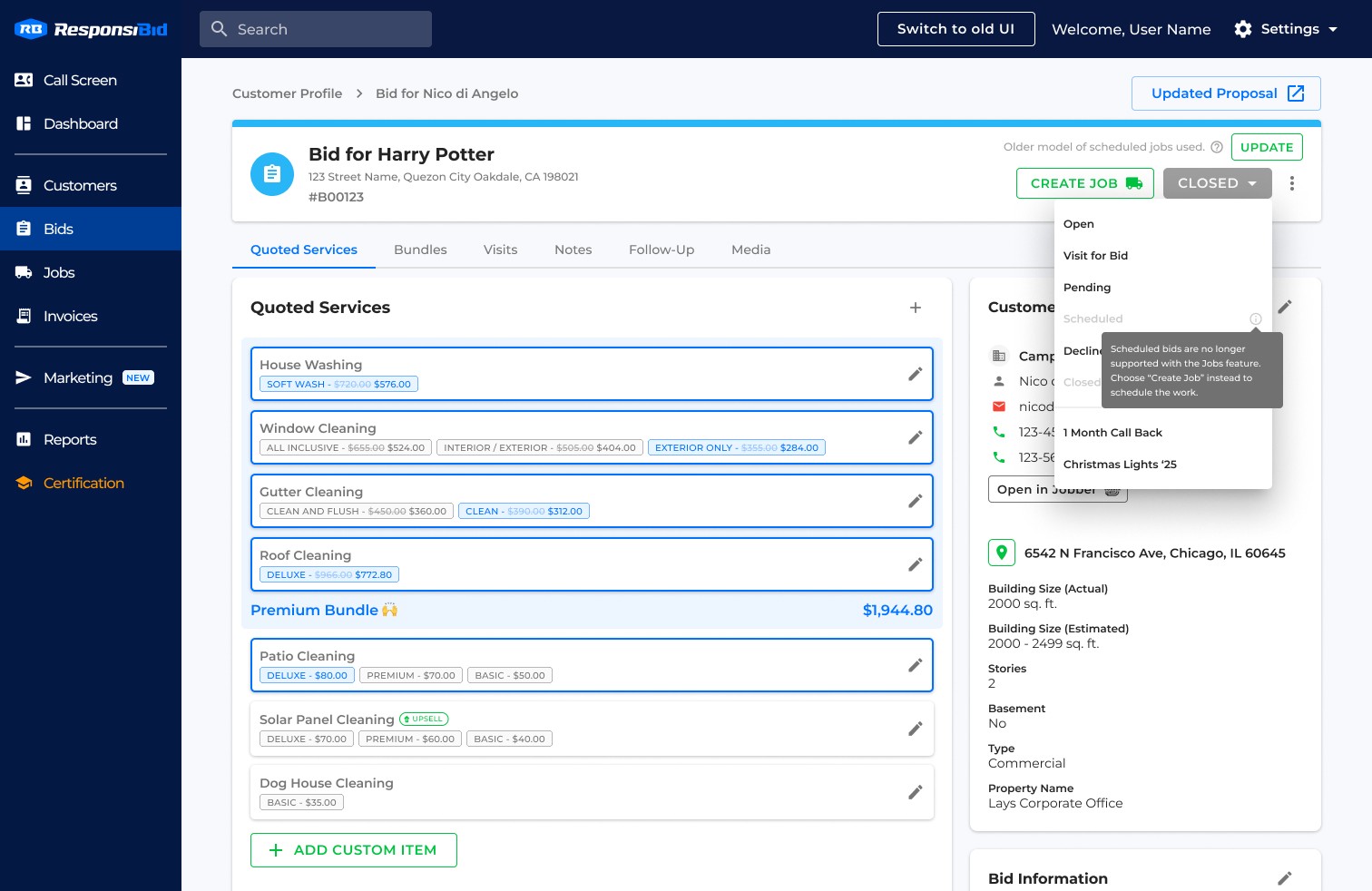
Creating Jobs separated scheduled work and history from the proposal. This meant moving scheduled and closed statuses (and their follow-up sequences) to the job, and it had to be clear how to schedule a job from the bid. I created a solution for this, backed by user research that showed the separation was logical to existing users. This separation rippled into dashboard actions, notifications, and merge fields, all of which were carefully executed, with a focus on usability and minimized disruption.
The sidebar was restructured so that every item earned its place through actual usage data and user feedback.
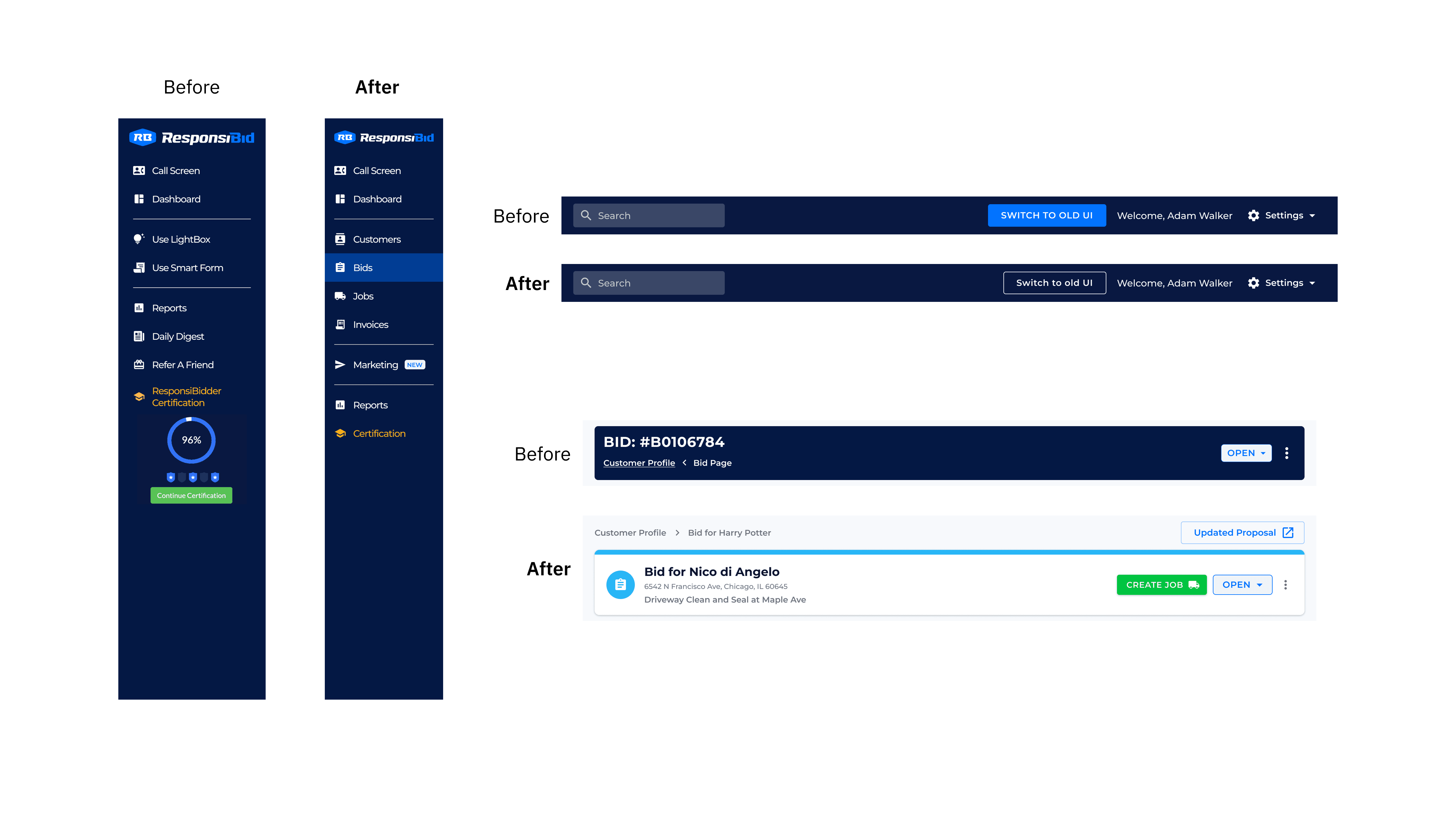
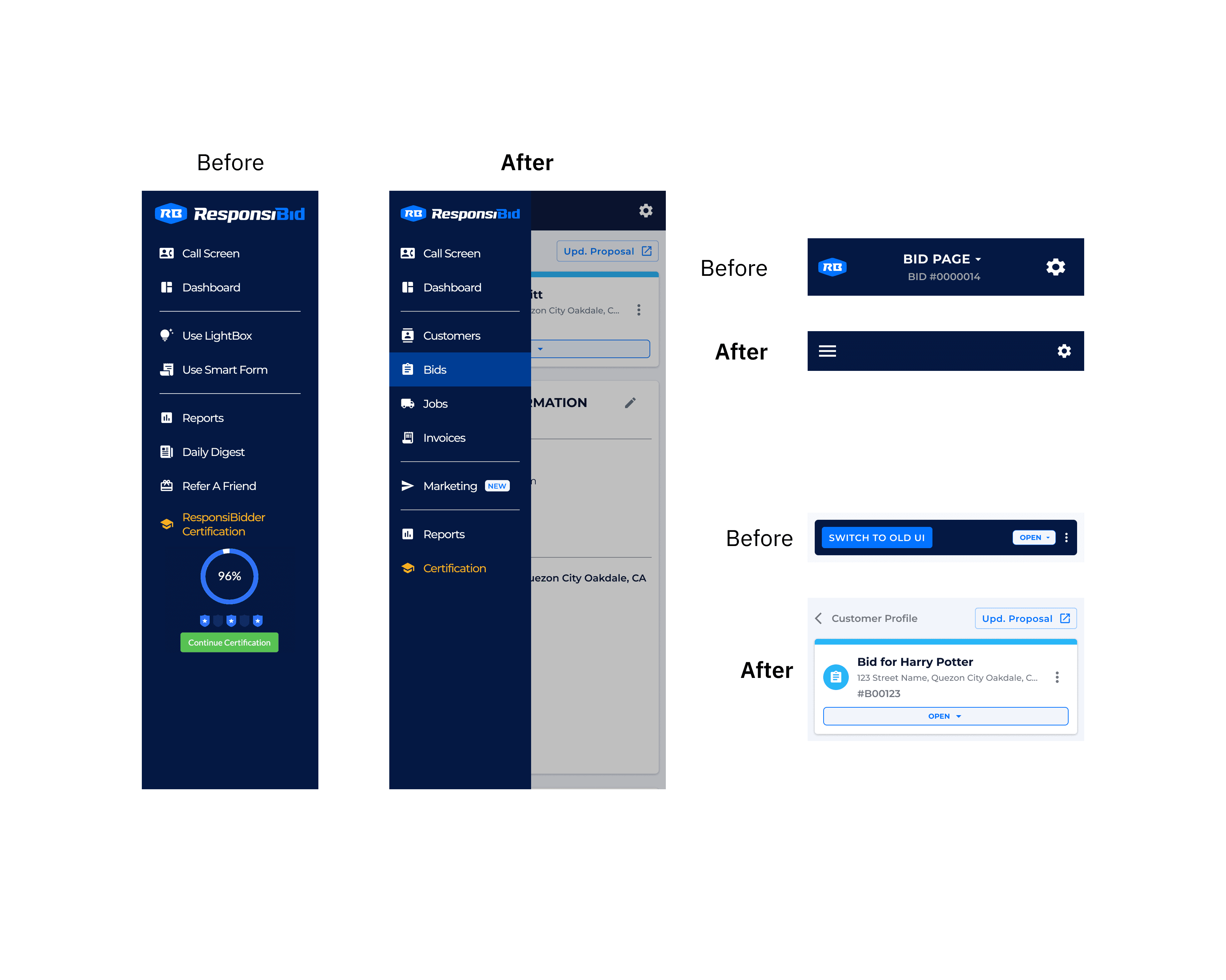
Before
Page headers had inconsistent styling and poor navigation.
After
Page headers received consistent styling, including navigational improvements such as breadcrumbs.
To migrate or not to migrate?
Respecting existing account data
Because of the significant changes to architecture and workflow, I prioritized co-creating with users to mitigate the risk of doing something that didn't land well. Engineering and product intended to migrate all existing account data into the new structure, but it became readily apparent in user testing that users didn't want their current work history affected by this transition. I pushed to respect this anxiety that surfaced in several user sessions, and the result was the decision to apply the new structure only to future work: New jobs used the new workflow, but existing bids could be left untouched. Feature flags gave users the flexibility to adopt the operational workflow at their own pace.
Existing bids would remain without migration. When users wanted to resell old bids, they could apply the new structure to each isolated bid as needed.
Partnering with a payment processor
Invoicing required payment processing, and building our own would have been cost-prohibitive. I evaluated the UX of leading home services payment processors, assessing embedded vs. redirect-based experiences. The chosen partner offered a fully embeddable solution that kept users within ResponsiBid, and their developer toolkit gave us the control to build research-backed experiences. Through customization options provided by the partner, I ensured fonts, colors, and stylizations were consistent with ResponsiBid's look and feel.
One complexity was calculating sales tax for final pricing, something that was previously avoidable for sales functionalities. I ran a targeted AI analysis of competitor tax workflows and found most were bare-minimum implementations with manual entry, single-jurisdiction assumptions, and little automation. With automation being ResponsiBid's greatest competitive advantage, I set up logic that allowed tax profiles to be configured in settings and applied automatically based on job location and services. Users praised it in testing for its simplicity — it elegantly accounts for varying tax jurisdictions without requiring manual calculation.
Shipping the Vision
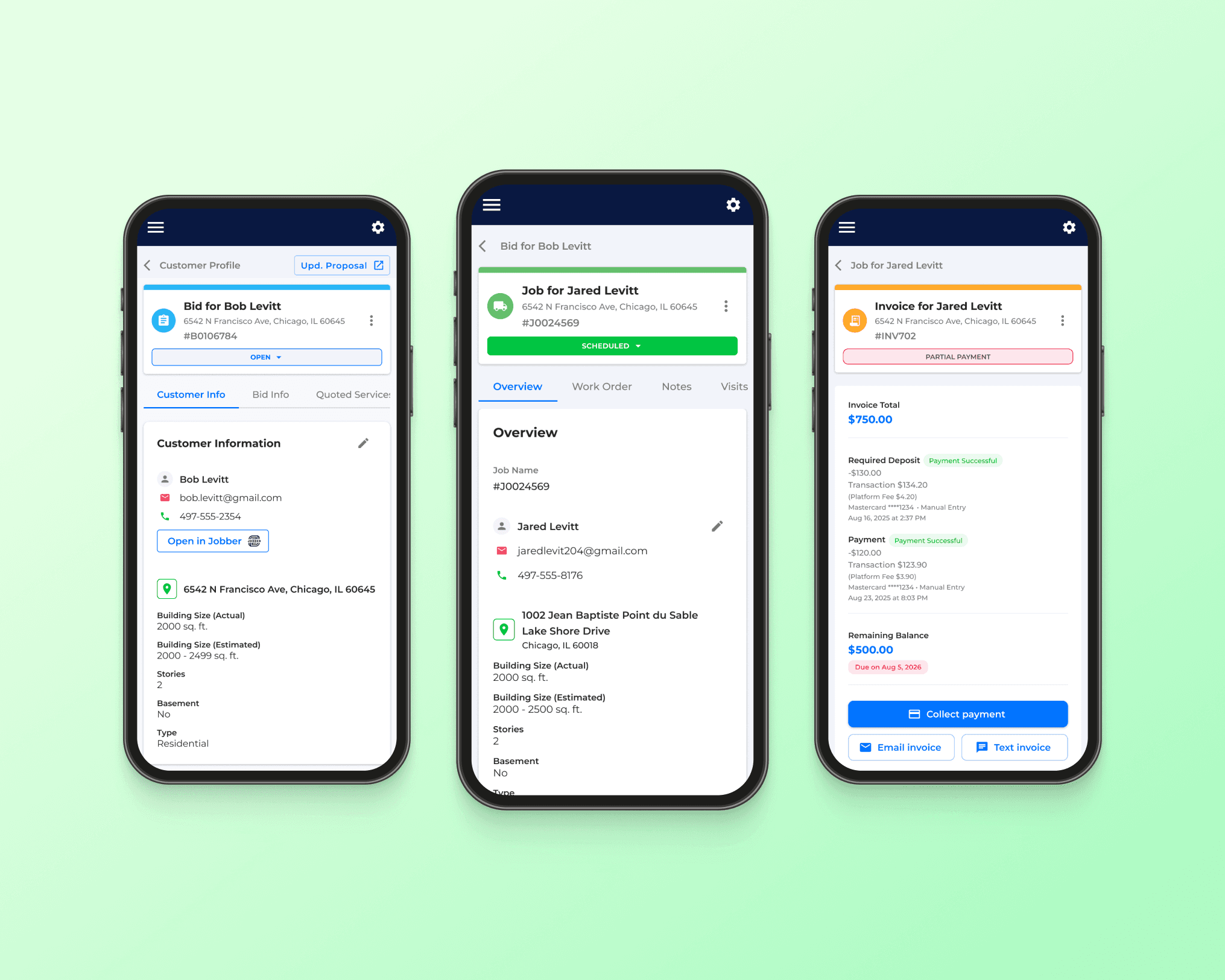
Designing the job page
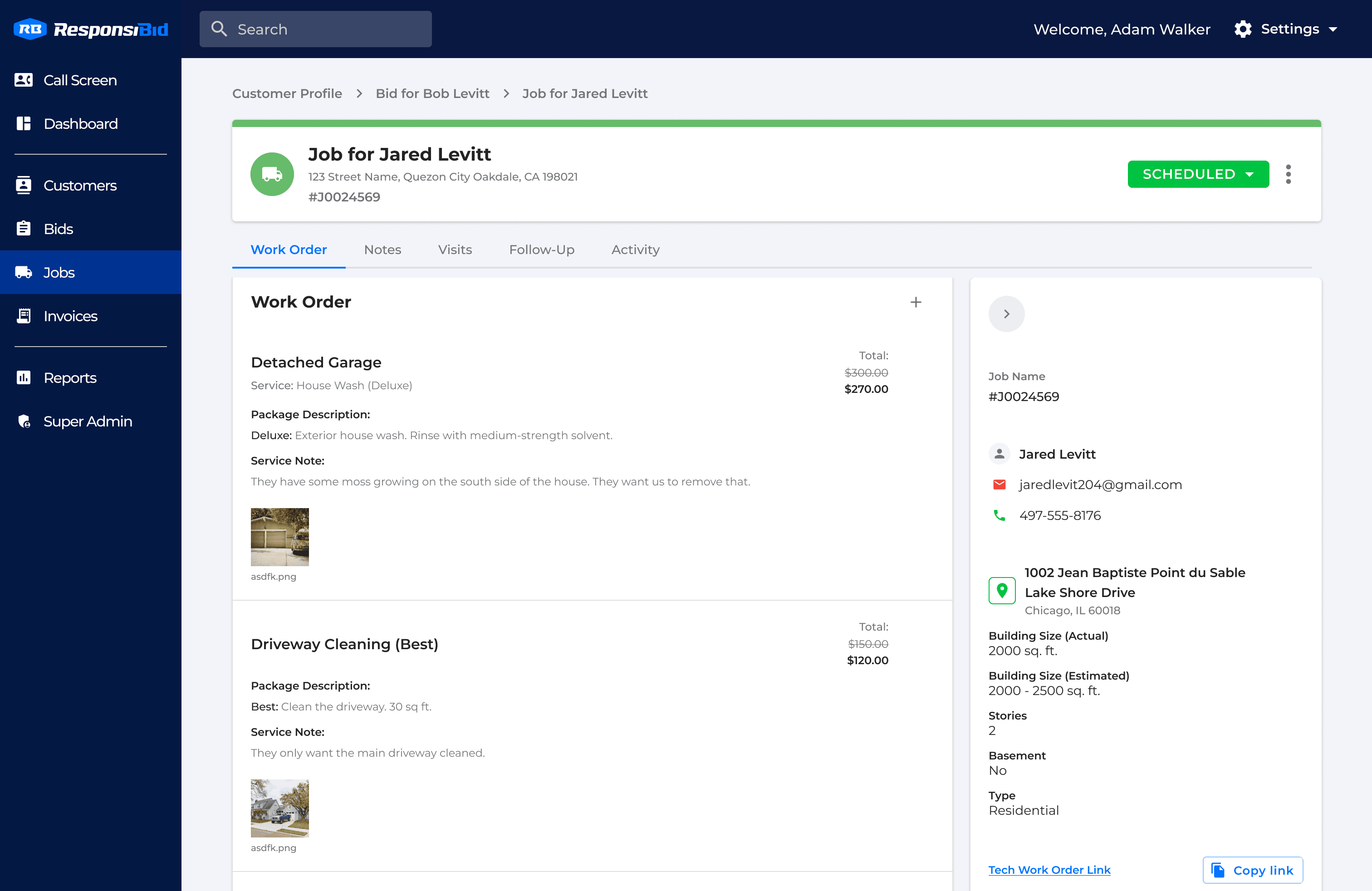
The job page went through three navigation patterns before we landed on the right one. The legacy UI hid service details inside expandable cards — users had to click to reveal information. The initial new UI went the opposite direction with everything visible through vertical scroll, but users found it hard to navigate a long page quickly. The solution was a blend: show everything at once with the most important information at the top, but add tab navigation so users could jump between sections without scrolling. This gave users the at-a-glance visibility they wanted with the efficient navigation the legacy experience offered. The final layout outperformed both previous versions.
"I don't want to have to click and see everything on different pages. Scrolling is so much faster… the tabs at the top just let me know where I am on the page and help me get there faster, as opposed to loading a whole new page. Tabs for us are easiest because if you see it, visually see it, you know where you're going." — Joe B., during a user test
Customer details presented a related challenge. Users needed an easy reference to customer information while working, but they also wanted sufficient working space for primary tasks. A side bar was introduced with the ability to collapse where more working space was needed.
"It's easier having the services right there bigger. Customer information we're not really editing. It's always going to be the services we're going to edit." — Jaimie S., during a user test
"Having the work order line items go across the whole page, they're less cluttered. It's easier to see each of the things, the description and the different service notes." — Sarah K., during a user test
Users can navigate the page by scrolling or using the tabs to jump to anchored positions on the page. Customer info is prioritized in the side panel for easy access.
Designing the invoice page
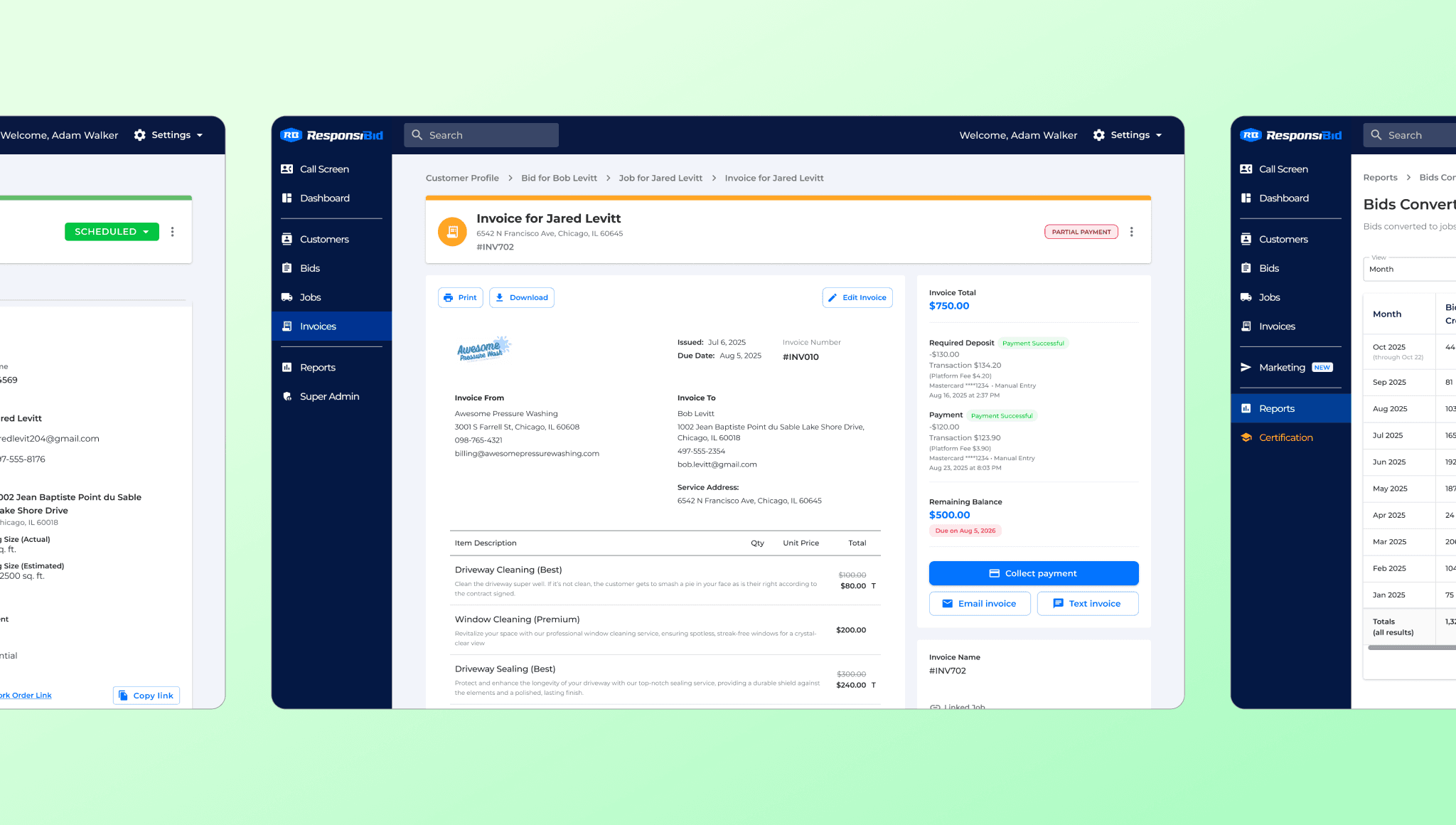
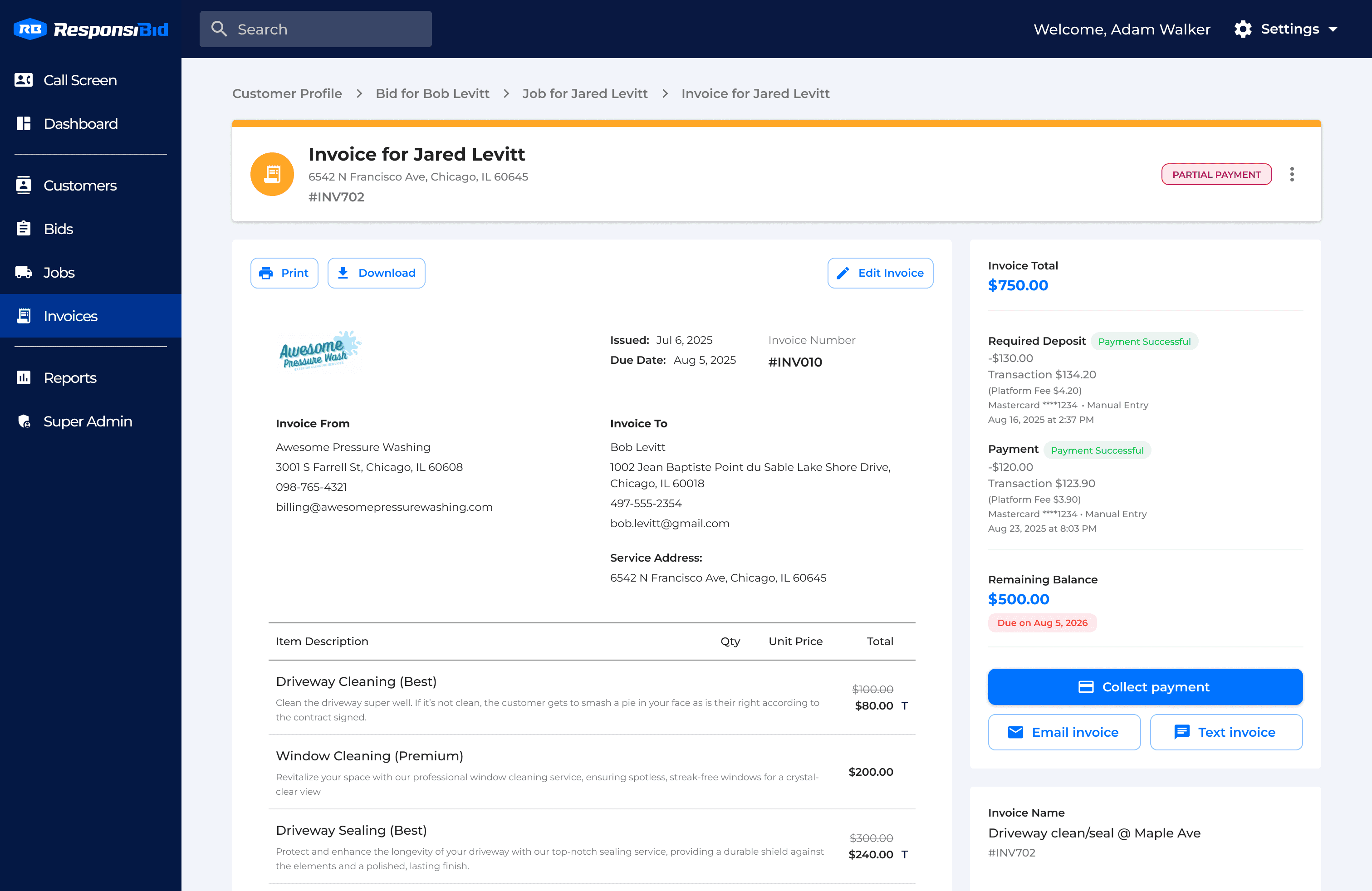
The invoice page needed to feel immediately distinct. In the initial beta, the customer profile and bid page looked so similar that users couldn't tell which page they were on, losing their place and wasting time reorienting. I chose a "paper sheet" layout rather than the card format used elsewhere. This visually distinguished the page and matched the simpler nature of an invoice — users didn't need service notes or technician images here, just basic information for the customer to reference while paying. The cleaner layout kept focus on the page's primary task: collecting and ensuring successful payment. In user testing, zero users reported confusion about which page they were on — a direct improvement over the initial beta where page similarity was a consistent pain point. Users also loved immediately seeing the initial deposit deducted from the invoice:
"Sometimes customers will say to me, 'Oh, have I paid already?' So at least this helps me to be like, yeah, you've already paid a deposit." — Stuart M., during a user test
The editing model also differed by design. Where job page actions were dispersed and varied, invoice actions were few and often edited together — final pricing, sales tax, payment terms. Grouping these as a full-page inline edit with the sidebar collapsing automatically during editing gave users a wider working space exactly when they needed it. Modals followed the same philosophy established on the job page: reserved only for tasks requiring dedicated focus, like sending the invoice and collecting payment.
Primary page space was reserved for regular tasks while reference information was placed in the side panel.
Overcoming friction going to market
This is where plans met reality. There was excitement throughout the company, but as we went to market, we realized there was more friction in changing user workflows than we anticipated. Many said they couldn't leave their current tools until we had advanced features not included in our MVP. Others couldn't prioritize office training until their busy season slowed down. Despite thorough planning, there were inevitable real-world constraints.
A major pivot was to integrate our new work orders with partner CRMs to reduce the barrier to entry. While this felt counterintuitive at first, it allowed users to see new features in action without changing their whole process. Instead of creating a divide, we strengthened ResponsiBid's side of the integration. This prioritization of customer experience is expected to deepen user trust and help them see the value of converting to the full feature set when the time is right.
Where We Are Now
50% of invited beta users have adopted new platform features, and momentum is building. Over $60,000 of payments have been processed through ResponsiBid, and the product is fulfilling the needs of this previously underserved market segment. ResponsiBid can now serve businesses across their entire lifecycle, not just the sales stage. The same businesses we used to lose because we couldn't support their operations now have a reason to stay.
Reflections
This project changed how I work. When I joined ResponsiBid, I was focused on improving what existed: making interfaces clearer, reducing friction, solving usability problems one screen at a time. Through this work, I learned what it means to shape a product's direction from the inside: building a vision with my product manager, defending design decisions with research, navigating engineering tradeoffs, and staying aligned across a team building something none of us had built before.
The biggest lesson was about staying user-focused when the pressure is to move fast. It would have been easy to ship features that checked a box — work orders, payments, done. But the moments that mattered most were the ones where we slowed down: talking to users about how migration would affect their data, choosing invoice-level deposits because it matched how they actually worked, integrating with partner CRMs instead of forcing a wholesale switch. Every time we prioritized the user's reality over our internal timeline, the product got better and adoption got easier. That discipline — aligning what users need with what the business needs, even when they seem to pull in different directions — is what I'll carry into everything I do next.